11. Services and port forwarding
Exposing a resource (e.g. pod, replicaset, or deployment) using kubectl creates a service:
$ kubectl run pod-hello --image=pbitty/hello-from --port=80
pod/pod-hello created

$ kubectl expose pod pod-hello --type=NodePort
service/pod-hello exposed
We can now access the pod-hello service from the host machine:
$ minikube service pod-hello --url
http://192.168.49.2:31500

$ curl $(minikube service pod-hello --url); echo
Hello from pod-hello (10.244.0.7)
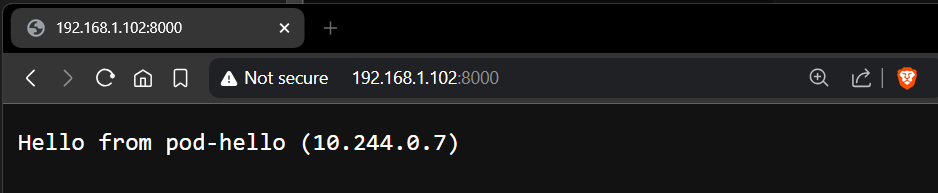
Note that the IP address returned by curl (10.xx.xx.xx) is for the minikube cluster’s internal network, while the IP address returned by the first command (192.168.49.xx) is for the bridge network used by Minikube. To expose the service to other machines, we need port forwarding:
$ kubectl port-forward --address 0.0.0.0 svc/pod-hello 8000:80
Forwarding from 0.0.0.0:8000 -> 80
We can, of course, relegate our port-forwarding tasks to the background:
$ kubectl port-forward --address 0.0.0.0 svc/pod-hello 8000:80 &>/dev/null &
[1] 698879
$ kubectl port-forward --address 0.0.0.0 svc/pod-hello 8080:80 &>/dev/null &
[2] 699035
$ kubectl port-forward --address 0.0.0.0 svc/pod-hello 8888:80 &>/dev/null &
[3] 699192
$ jobs
[1]   Running                 kubectl port-forward --address 0.0.0.0 svc/pod-hello 8000:80 &> /dev/null &
[2]-  Running                 kubectl port-forward --address 0.0.0.0 svc/pod-hello 8080:80 &> /dev/null &
[3]+  Running                 kubectl port-forward --address 0.0.0.0 svc/pod-hello 8888:80 &> /dev/null &
$ kill %1
[1]   Terminated              kubectl port-forward --address 0.0.0.0 svc/pod-hello 8000:80 &> /dev/null
$ kill %2
[2]-  Terminated              kubectl port-forward --address 0.0.0.0 svc/pod-hello 8080:80 &> /dev/null
$ kill %3
[3]+  Terminated              kubectl port-forward --address 0.0.0.0 svc/pod-hello 8888:80 &> /dev/null
$ jobs
Note how we were able to expose multiple ports, all pointing to the same service.
Clean up by deleting the created pod and service:
$ kubectl delete pod/pod-hello service/pod-hello
pod "pod-hello" deleted
service "pod-hello" deleted
11.1. YAML specification
apiVersion: v1
kind: Pod
metadata:
  creationTimestamp: null
  labels:
    run: pod-hello
  name: pod-hello
spec:
  containers:
    - image: pbitty/hello-from
      name: pod-hello
      ports:
        - containerPort: 80
  dnsPolicy: ClusterFirst
  restartPolicy: Always
---
apiVersion: v1
kind: Service
metadata:
  name: pod-hello
spec:
  selector:
    run: pod-hello
  type: NodePort
  ports:
  - name: http
    protocol: TCP
    port: 8000
    targetPort: 80
    nodePort: 31080

Right click > “Open image in new tab” to view full-size.
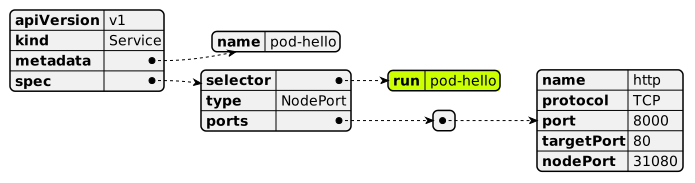
Note that the selector for the service matches the label for the pod.
$ kubectl create -f pod-hello-svc.yaml
pod/pod-hello created
service/pod-hello created
$ curl `minikube service pod-hello --url`; echo
Hello from pod-hello (10.244.0.8)
$ kubectl get svc,pod
NAME                 TYPE        CLUSTER-IP      EXTERNAL-IP   PORT(S)          AGE
service/kubernetes   ClusterIP   10.96.0.1       <none>        443/TCP          5h20m
service/pod-hello    NodePort    10.98.186.154   <none>        8000:31080/TCP   91s

NAME            READY   STATUS    RESTARTS   AGE
pod/pod-hello   1/1     Running   0          91s
$ kubectl port-forward --address 0.0.0.0 svc/pod-hello 8000:8000 &>/dev/null &
[1] 705964
The service can now be accessed externally as before.